
kelley opened this issue on Jun 20, 2005 · 8 posts
kelley posted Mon, 20 June 2005 at 6:18 PM
I downloaded Transposer 2.0 and ran the installer. Everything seems to have gone allright. At least it didn't throw up any Error Messages. But the Install Wizard didn't ask me where I wanted it installed either and I can't find the installed program. Where on my hard-drive would Transposer want to install itself?
I've looked in Windows Explorer>Program Files. It's not there. I've done a Search [for 'TRANSPOSER 2.0'] and it says 'no files found'. Not even the downloaded zipped program or the installer, both of which use those words.
I've sent this same message to Eovia, but God knows when they'll get back to me, if ever. Any ideas?

Patrick_210 posted Mon, 20 June 2005 at 6:47 PM
Transposer becomes part of Carrara, it's not a stand-alone program. First, open Carrara. Then, in the drop down for file types you will see PZ3. This is the Poser extension. After you select your Poser file it may ask you to track down some of the texture files. But, basically that's it. Patrick
kelley posted Mon, 20 June 2005 at 7:12 PM
Patrick: Not too clear on "the drop down for file types". Where do I have to be to find that menu?

ShawnDriscoll posted Mon, 20 June 2005 at 9:38 PM
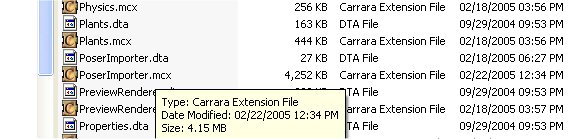
In the File Open menu. You should also have a file called PoserImporter.mcx with a date of Feb 22 (PC version) in your Extensions folder. You'll know it works if you can import a Poser 5 figure and you see its dynamic hair.
kelley posted Tue, 21 June 2005 at 6:24 PM
First, I have a scene built in Carrara 4 Std.0. After posing "The Girl" in Poser and getting something that I liked, I exported it as an .obj to Carrara. Of course it needed changes. Enough so that I bought and installed Transposer.
Now, in trying to get The Girl over to Carrara again, I've got this far: FILE>OPEN>[folder where The Girl model is]>select the model>choose .pz3 from dropdown menu, and click OPEN. Then it wants me to locate poser.exe. I navigate to PROGRAM FILES>CURIOUS LABS>POSER and double click. [even tho' Poser is already open and running.] Then, after a wait, it opens a new document window and installs The Girl.
But it's not in the document I've been building, and where is Transposer in all this? How do I ask for an update? Is there a [dreaded] .pdf file for Transposer? I have not heard back from Eovia.
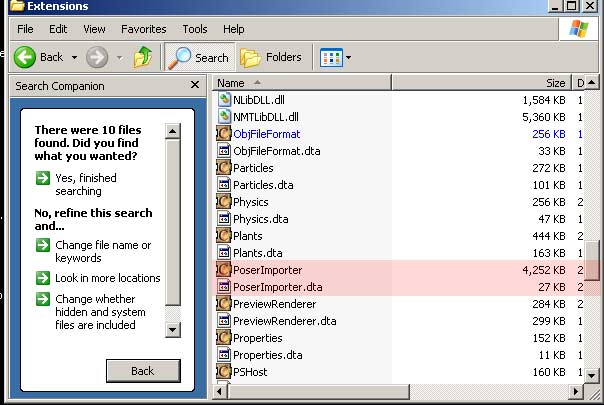
SHONNER: I found the Extensions file for Carrara 4. I'm appending a screen cap. There are .dta files aplenty. No .mcx files at all.
ShawnDriscoll posted Tue, 21 June 2005 at 8:16 PM
Patrick_210 posted Tue, 21 June 2005 at 8:26 PM
Sounds like it's working fine to me, except for having to locate the Poser.exe file. This a common problem,it will probably be able to find that on its' own after you have located it now. The reason it is a new file is because you just opened it, if you want it in an existing Carrara file then you should import it. Transposer is just an importer that loads the Poser figure with animation data in Carrara and then lets you modify the figure in Poser and update the changes in Carrara. The fact that "PZ3" is in the open files list means that Transposer is there. If you didn't have Transposer it would be a lot of work to bring in a Poser figure and the animation data would not be available to you, nor the dynamic hair. Patrick

Hoofdcommissaris posted Wed, 22 June 2005 at 8:18 AM
And to 'update' the figure (after 'importing' it), double click on it and you will be taken to the modelling room where there is an appropriate button. Good luck!