
anupaum opened this issue on Jan 30, 2026 · 198 posts
Richard60 posted Sun, 01 March 2026 at 12:48 PM
Sorry last night I wasn't feeling well. The problem you are having with the right cloth item is there is no weight map applied and it is an open-ended tube. To fix this is really simple. 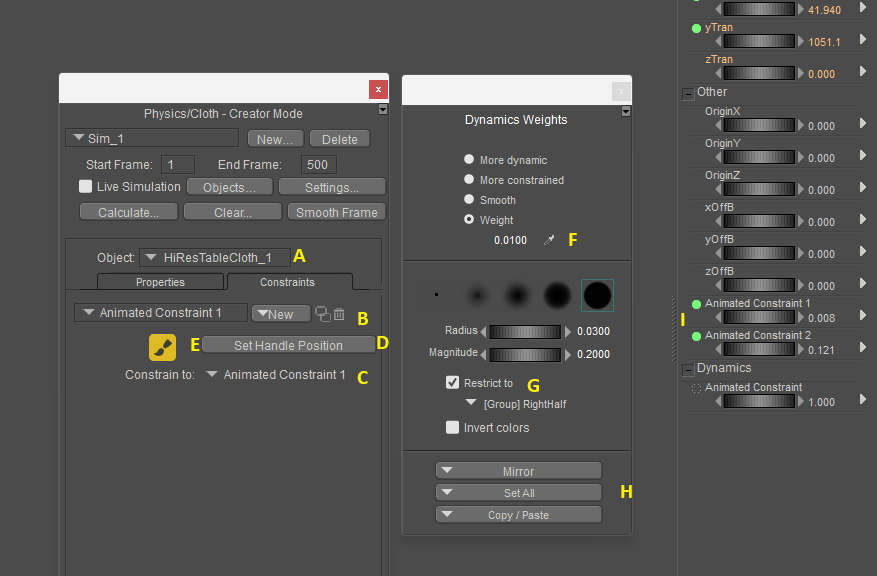
Step A make sure that the cloth item is selected in the object marked A
Step B Create a new Animated Constraint remember the name
Step C Here you need to select a body part to constrain the animated constraint to. If you don't when the figure moves the constraint will be left behind.
Step D press the Set handle position. If you don't then if you move the constraint handle it won't have an effect on the cloth. Not that you normally need to move the handle but you might.
Step E Press the paint weights button it will then open up the Dynamics weight dialog.
Step F select the Weight button and put in a value. I use small values most of the time. A value of 0.0100 should be a good starting point.
Step G Select the Restrict to and select the part of the cloth you want to paint. It could be either a Material or Group.
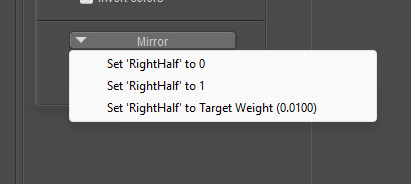
Step H press the Set All button and when the popup shows press the bottom one Set "Part" to Target Weight (x.x). This paints the part with the selected weight value. I whole lot faster then trying to paint with the brush.
Step I adjust the constraint dial to a low value. This will be trial and error process as between the weight you have on the cloth and the dial value will determine how much cloth will free float.
And the program is not broken it is just that this process is meant for creators to make NEW cloth items. Once the weights are applied and working then you save the prop back to the library and next time you load it the item it will come in with the values you have assigned. Since the cloth items you have shown are not close to a body part then the program leaves them un-weighted, otherwise you would have to go in and delete the assigned values and apply your own. As it is now the Auto assigned weights are fairly close and make a starting point.
The reason you have those long draping tubes is that the bottom is open that is not connected to another part. That along with the fact there is no weight map to restrict the movement the cloth will stretch. If you were to look at the Mesh you will find that the top polys are very long and each row down will be one set of polys shorter then the one above until you get to the last row and they will be unchanged. If the polys are perfect squares then the bottom will be a square the next row up will be 2x taller and third row will be 3x taller etc. This caused by the weight of each point pulling down on the cloth.
Poser 5, 6, 7, 8, Poser Pro 9 (2012), 10 (2014), 11, 12, 13, 14