
anupaum opened this issue on Jan 30, 2026 · 198 posts
hborre posted Mon, 09 February 2026 at 8:02 PM
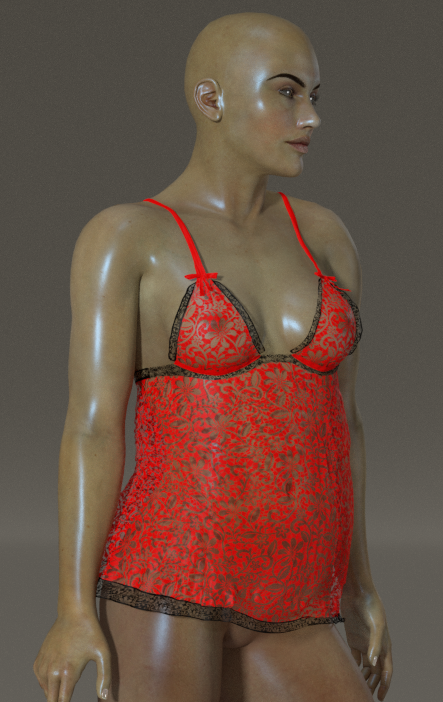
I decided to start simple after rereading the manual tutorial several times to understand the workflow. I loaded Danw SR2 into my P14 scene and dressed her in an old PhilC dynamic Babydoll outfit. Nothing fancy, nothing complicated. After playing with settings and running several simulations, I managed to render the image below. Note: Dawn has a slight bodybuilder morph, and I kept the pose simple with tweaks to move her arms away from her body. Excuse the nudity.
These are my settings below:
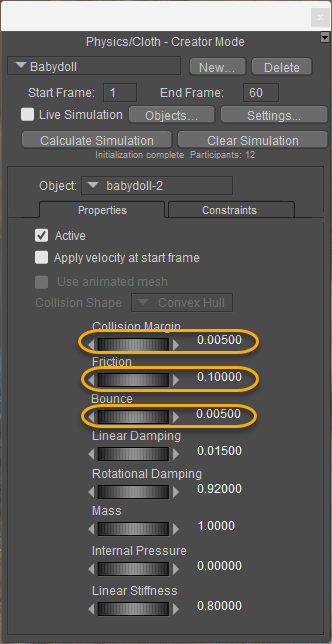
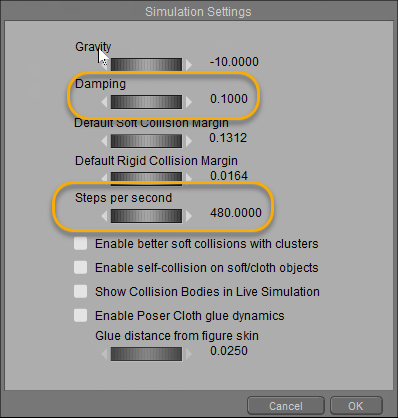
My observations:
First, increase the Steps per Second. This will allow the clothing to drape better; the default is 120 steps, and I increased mine by four. It takes a little longer, but it can make the clothing fit better.
Second, reduce the damping. You do not want the clothing sticking to the figure; the lower, the better.
Third, reduce the bounce. I'm not quite sure how relevant this setting is, but reduce it anyway.
Fourth, like the damping above, reduce the value. By default, it is set to 0.5. Try something lower that will make the clothing conform better.
Fifth, if you intend to save the prop back to the Library, turn off the 'Enable Poser Cloth glue dynamics' after doing an initial calculation simulation. Make adjustments to the auto-generated glue settings instead. Don't reset your simulation, or you will lose your manual settings.
Tweak whatever you have until you get something satisfactory with minor adjustments.