
anniemation opened this issue on Sep 22, 2025 · 4 posts
Y-Phil posted Tue, 23 September 2025 at 5:19 PM
Something you can do also, if you're not sure where your render cam (generally the Main one):
- Switch to the top camera
- in the hierarchy window: turn on the cameras
- make your camera visible (this will select the camera at the same time)
- menu: Display > Object > Cartoon (it's an example)
And you'll get something like this:
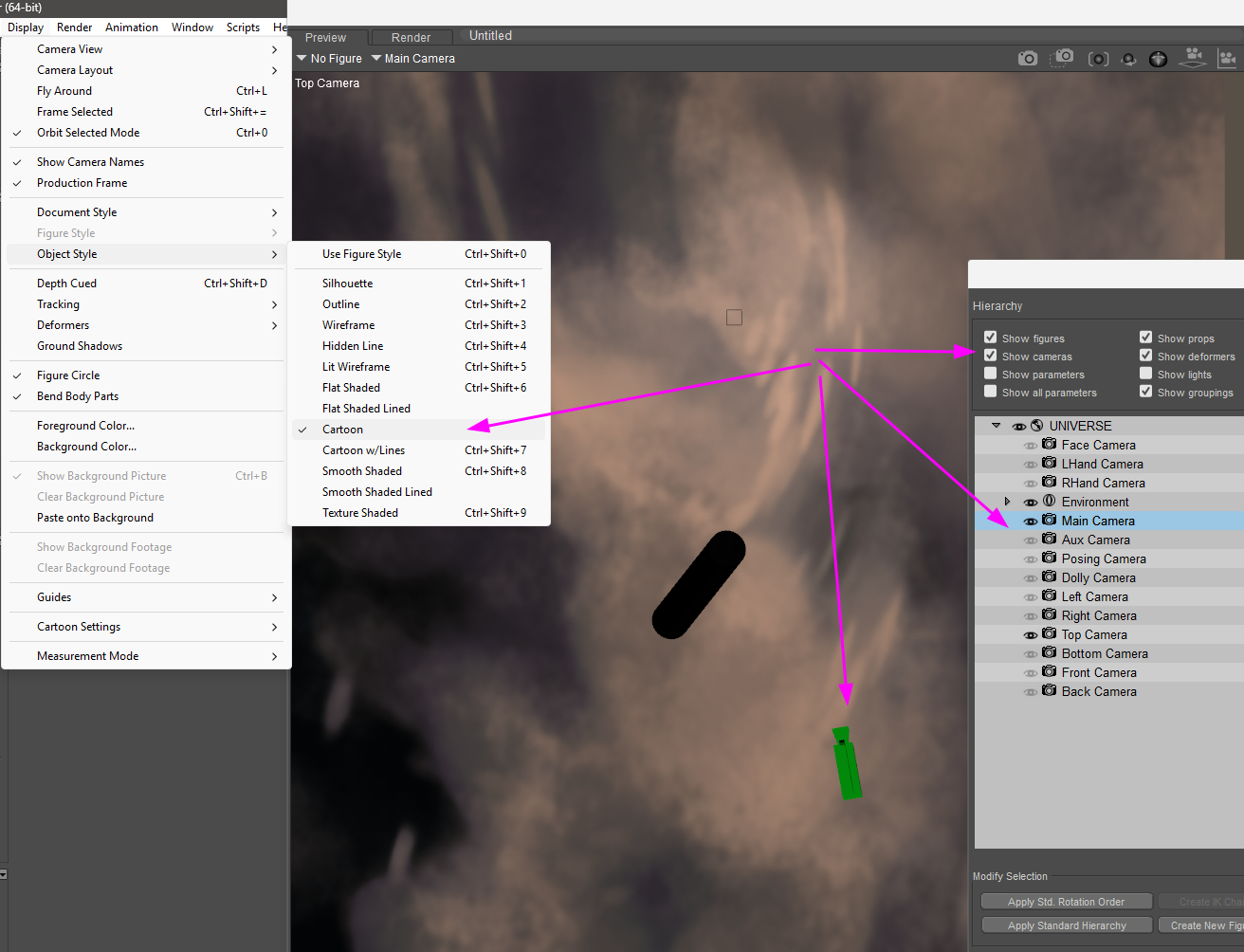
And it will ease the process to position correctly the said camera, when there are walls or any object not visible in the preview.
Then with the camera still selected, use the Translate/Pull tool to move it 
𝒫𝒽𝓎𝓁
(っ◔◡◔)っ
👿 Win11 on i9-13900K@5GHz, 64GB, RoG Strix B760F Gaming, Asus Tuf Gaming RTX 4070 OC Edition, 1+2 TB SSD's, 6+4TB HD
👿 Mac Mini M2, Sequoia 15.5, 16GB, 500GB SSD
👿 Nas 10TB
👿 Poser 13 and 14 ❤️