Truestar opened this issue on Apr 04, 2022 · 9 posts
Truestar posted Tue, 05 April 2022 at 4:54 PM
First...THANK YOU!!!
So, there was a huge amount of data to unpack there but I now have what I was looking for and new questions.
Hovering over "My Library" I saw ...user/Marc/Documents/DAZ 3D/Studio/My Library
Navigating to .../Documents/DAZ 3D/Studio", I saw /My Daz Connect Library/data/cloud"
But that directory was empty
Under "My Library" is a link: "My DAZ 3D Library" and hovering over showed "...user/Marc/Documents/My DAZ 3D Library"
But, navigating to "...user/Marc/Documents", I only see the DAZ 3D" directory mentioned above. No "My DAZ 3D Library" as expected.
Finally, under "My Library" and "My DAZ 3D Library" is a Second "My DAZ 3D Library"
Hovering over that shows the location: C:/DAZ 3D/Applications/Data/DAZ 3D/My DAZ 3D Library
So, there was a huge amount of data to unpack there but I now have what I was looking for and new questions.
Hovering over "My Library" I saw ...user/Marc/Documents/DAZ 3D/Studio/My Library
Navigating to .../Documents/DAZ 3D/Studio", I saw /My Daz Connect Library/data/cloud"
But that directory was empty
Under "My Library" is a link: "My DAZ 3D Library" and hovering over showed "...user/Marc/Documents/My DAZ 3D Library"
But, navigating to "...user/Marc/Documents", I only see the DAZ 3D" directory mentioned above. No "My DAZ 3D Library" as expected.
Finally, under "My Library" and "My DAZ 3D Library" is a Second "My DAZ 3D Library"
Hovering over that shows the location: C:/DAZ 3D/Applications/Data/DAZ 3D/My DAZ 3D Library
Now, this is a huge amount of data sitting in C: root! And DAZ does not seem to allow for content management on install.
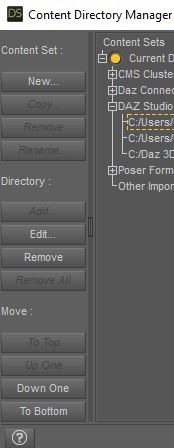
So, I looked into moving the data, but the "move" tools in Content Directory Manager only moves up or down in the existing locations. So, how do I move my data to a new directory on my E Drive? Do I have to create a new location in the app and then move the data?
And, does the data automatically move when I do that?