
NudeFan6 opened this issue on Sep 02, 2018 · 12 posts
NudeFan6 posted Thu, 04 October 2018 at 3:31 AM
Hi,
Once again to less spare time to play with 3D!
I tried to follow your instructions and succeeded until you started to copy the colour from the torso to the genitalia. If I see it correct in your pictures, you painted the black marker on the torso and genitalia before you moved the genitalia to a free area. But when I use the clone brush, I always had a part of the genitalia black. Nevertheless your instructions brought me to an other idea:
In DAZ I did the following: I created a standard G3F with a genitalia. Then I switched to Geometry Editor and hided (and finally deleted) all polygons around the area outside of the genitalia. Then I deleted the genitalia, and imported it again, but not into the remaining torso. This allowed me to move the genitalia to an exact distance left of the torso. Then I created a small sphere and changed the Z position that it's before the (remaining) torso and the Y-value that it's above the genitalia. I created a second one at the same y and z position, but used the x offset from the genitalia.
This Scene I exported as Obj-File and imported it into BS. Then I applied the torso map to the torso, a blank one to the genitalia, aligned the clone brush to the two spheres and copied the torso colour to the genitalia.
Since it's a little hard to get all areas that way I improved this by doing the following in DS: I spread the legs of the G3F to the maximum before I removed the superfluous polygons. To do the same spread on the genitalia I used a figure with genitalia it her spread the legs before I made it invisible.
In BS I rotated this object by 70° vertically and have now an environment like shown in the picture. Once setup the clone brush I can import all torso-files, copy them to the genitalia and export it then. This works really fine.
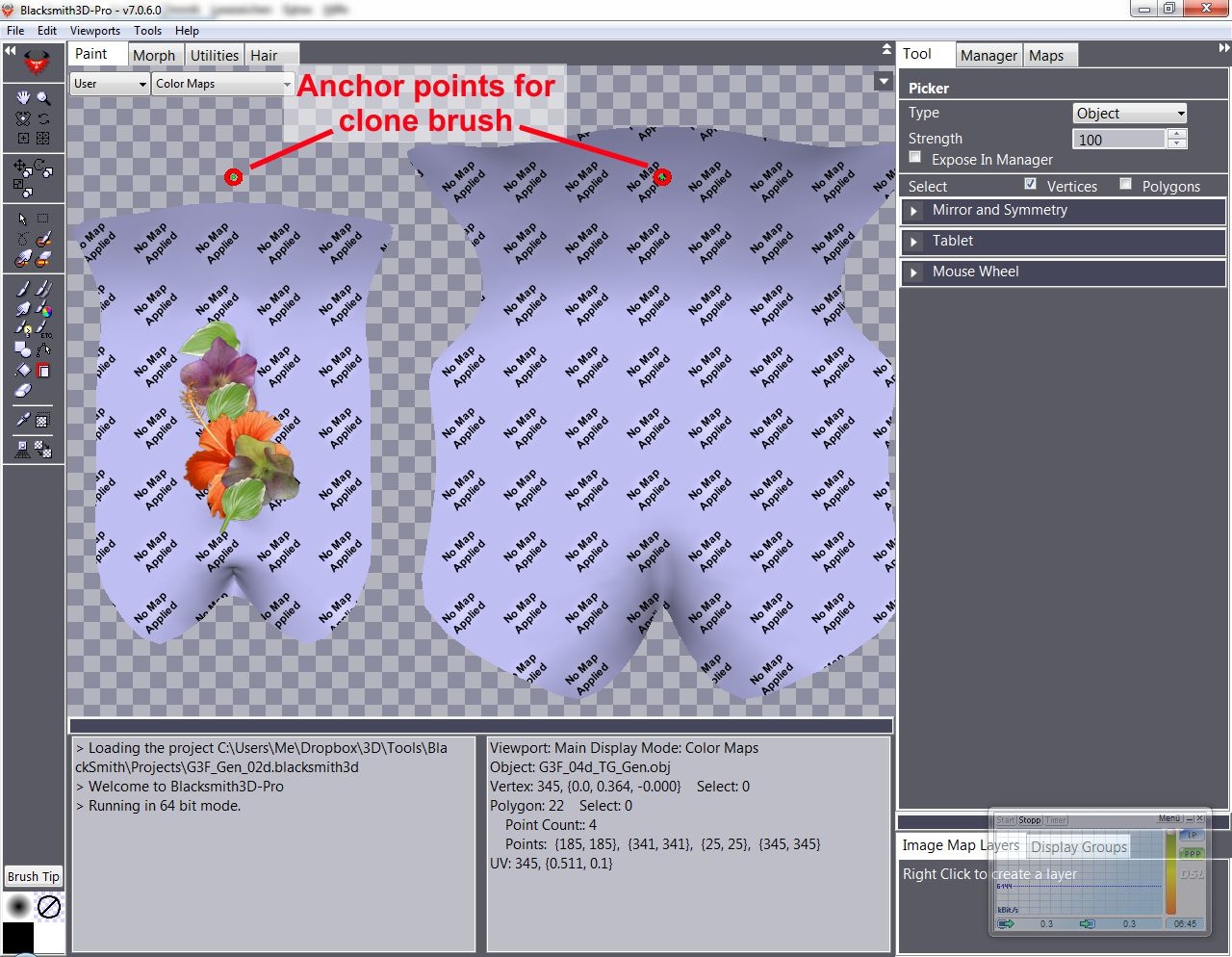
Then I tried to improve the entire stuff again and exported my DAZ-Scene in 3 different sub objects: One containing the anchors for the clone brush, one the torso and one the genitalia. I imported them together in one BS-Project. When I then applied the torso file to the torso I hadn't been asked anymore, if I want to use this texture for all objects. But: When I select the torso as active object the colour appears like in the torso file, when I select the genitalia, it becomes darker. As long as I press the mouse button the copied texture appears in the original torso colour, when I release the mouse button it becomes as dark as the torso. When I export the file it is also darker. When I use this texture file then on the figure, the colour does not match while with the other method it matches perfectly.

What do I wrong, that I can't copy the same colour from one object to a different one?