
LuxXeon opened this issue on Dec 15, 2013 · 66 posts
LuxXeon posted Wed, 18 December 2013 at 8:56 PM
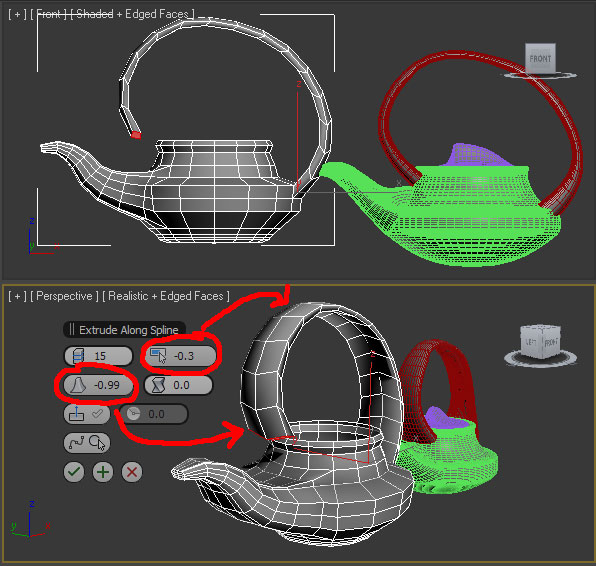
So, with that in mind, the way I'm going to attack this handle is two-fold. My first step is to create a spline that matches the handle you have on your model. After creating the spline, I adjusted it so that one end is directly in contact with the polygons I plan to extrude, and the ending point is near, but not too close, to the polygons I intend to bridge it with to complete the loop.
This is the result of the Extrude on Spline function, with the settings shown in the caddy menu. I added some taper, so that the end is more in the shape of the polys in that area where I will bridge, and I added some taper to the curve, because the handle is thinner at the top than where it starts and ends.
Now I'll attempt to bridge the end polys to complete the loop.
______________________________________
My Store
My Free Models
My Video Tutorials
My CG Animations
Instagram: @luxxeon3d
Facebook: https://www.facebook.com/luxxeon