
LuxXeon opened this issue on Dec 15, 2013 · 66 posts
LuxXeon posted Wed, 18 December 2013 at 8:14 PM
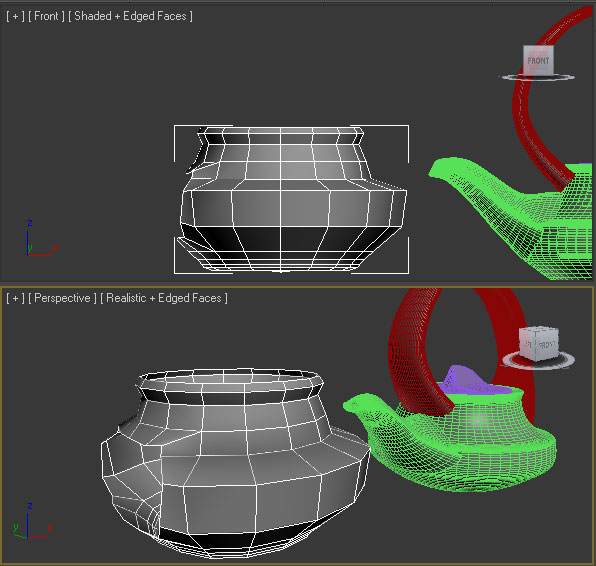
I started by making a very rudimentary copy of the base of your pot. I'm not sure what workflow you employed for that part originally, but it looks like it could have been a lathe, or perhaps you started with a cylinder? I decided to start by simply inserting the default 3dsmax teapot primitive in the scene, and scaled it to roughly match your teapot dimensions. I used the parameter dials to dial down the edges to the most economical shape, while providing the resolution I knew I'd eventually require for the future editing operations. Anyway, I deleted the lid, spout, and handle that are part of the parametric teapot, and converted the base to editable polygon. Next, I added a turbosmooth modifier to the stack (I could have used meshsmooth, or just enabled Nurms in the editable polygon panel for the same results), and began shaping the pot to match yours with simple subD techniques. Then, I selected and removed the faces in the front of the pot that will eventually be where the pouring spout will sit. This left me with the object you see attached here.
______________________________________
My Store
My Free Models
My Video Tutorials
My CG Animations
Instagram: @luxxeon3d
Facebook: https://www.facebook.com/luxxeon