
Burpee opened this issue on Oct 20, 2013 · 13 posts
seachnasaigh posted Sun, 20 October 2013 at 9:29 PM
The IDL emitter will have very high ambient value, so it would appear as basically a flat white silhouette. The trick is to conceal the emitter. In P9 and later, you can simply un-tick the visible in camera box (and also casts shadows box) in the properties tab of the prop's parameters panel.
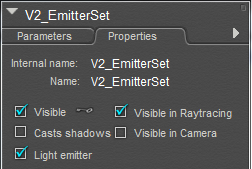 .
.
If you have another mesh surrounding the emitter, that object will need to have casts shadows un-ticked, or it will block the light.
Bear in mind that the emitter will cast only diffuse light; for best render results, I prefer to use both an IDL emitter mesh and either a point or spot light. The Poser light will provide specular highlights which an IDL emitter prop lacks. The IDL emitter provides a more realistic distribution of light than the poser light.
If you make a candle, give the wax considerable SSS, so that it has some translucence.
edit: cross-posted with hborre! :P
Poser 12, Poser 13, Poser 14, in feet.
OSes: Win7Prox64, Win7Ultx64, Win11
Silo Pro 2.5.6 64bit, Silo 2025.1, Vue Infinite 2014.7, Genetica 4.0 Studio, UV Mapper Pro, UV Layout Pro, PhotoImpact X3, GIF Animator 5