
Renderosity Forums / Carrara
Welcome to the Carrara Forum
Forum Coordinators: Kalypso, Anim8dtoon
Carrara F.A.Q (Last Updated: 2026 Apr 14 6:23 am)
Visit the Carrara Gallery here.

Subject: Carrara and Poser pro?


Yes and no. Carrara can load most all Poser formats; shaders will have to be tweaked though. Carrara can load Studio DUF, but none of the older studio formats, so studio mats wont work.
Carrara has far more options for working none studio content; which means practically any model in any format so you are not limited to studio or poser content.
Carrara was designed to work with standard models; 3DS, obj, LWO, ect. But can't save out in any Studio or poser format. So yes you can make clothes for V4 from scratch, but you will have to go to studio/poser to rig it. Studio has the tools for working the DUF rigging/weight mapping, carrara doesn't.
Carrara can use practically everything in you Poser runtime/s, you just need to add the runtime/s to you carrara content folder and you can use them directly in carrara; that doesn't include the new weightmapped figures.
Carrara does not have dynamic cloth, but Poser dynamic clothing can still be used. You can drape it in carrara, just not animate.
Carrara is sort of like 3DS meets Poser, done by DAZ. 
Carrara can't really do anything with the new weightmapped poser figures. But I beleve you can run them through Studio to fix this, just need to save them in DUF. Worked for Dawn.
For me, working in Carrara is faster, but I think that's a combination of having used Carrara on a regular basis much longer than I've used Poser. Carrara's scene manipulation is also just plain more straight forward than Poser's.
The newest Poser Pro (2014) has some nice tools for creating/tweaking content to fit just about any figure. It's fitting room (for fitting clothes to other characters) works pretty well. While it has more steps to go through than Studios/Carrara's autofit, I think it works much better. That's just my opinion. I just realized you said you had 2012. Except for the fitting room and a few other little things, 2012 can do most of what 2014 can.
Stan's right, Poser does have native dynamic cloth which Carrara does not have, but it can be used in Carrara. Studio's dynamic cloth is different than Poser's, and I do not know if it can be used effectively in Carrara.
Carrara's dynamic hair is much better than Poser's. You can style and manipulate dynamic hair in Carrara. You can't really do much of that in Poser.
There are a whole host of plugins available for both programs that extend their capabilities.
You can model Poser clothing in Carrara, but as Stan said you will need to go to either Poser of Studio to rig them (although I do seem to remember that there is a way to rig Poser content without having to use Poser. If you're interested, I can go through my old tutorials and see if I can find it). I personally don't find Carrara's modelling room to be very user friendly, but it does have the tools you'd need to create content.
It all really comes down to what you want to do. If you want to do landscapes, complicated scenes with lots of assets, special effects, etc., or animations then I'd go with Carrara. It's fast, responsive and very capable. If you want to do mainly character shots/portraits I'd go with Poser. It has much better subsurface scattering and it has the cloth room, hair room, and fitting room to work with as well.
I do use both programs. The project sort of determines which one I will use.
Stan's right, Carrara works with V4 and DAZ content just fine.
The various fixes for her joint bend issues work much better in Poser. And as far as I know, Poser doesn't have any problems with DAZ content. Most of what I use has come from DAZ. V4 can go in the Hair Room, she can wear dynamic clothes from the Cloth Room and she can wear clothes fit to her in the Fitting Room. I don't use it, but she may even be able to use the Face Room. Poser even comes with Wardrobe Wizard witch is also a big help in expanding V4s wardrobe.
Even Genesis will work in Poser (with DSON) although you can't put more than one or two dressed figures in a scene before it starts to slow things down.
I use both Carrara and Poser Pro (2012 and 2014) and quite often I begin a project in Poser that I find will work better in Carrara. I save the scene or the characters in Poser and open them right up in Carrara. With a little tweeking I'm ready to go.
Like I said before, it all depends on what you're ultimate goal is as to which software will be better for you.

Quote - Yes and no. Carrara can load most all Poser formats; shaders will have to be tweaked though. Carrara can load Studio DUF, but none of the older studio formats, so studio mats wont work. Carrara was designed to work with standard models; 3DS, obj, LWO, ect. But can't save out in any Studio or poser format.
Stan
Is this issue new to C8.5? I mean DS mats not working. I us DS mats all the time in C7Pro.
If this is true, it's a very big step in the wrong way.
I have never tried to use 3DS models in Carrara. Do they work well or is there a lot of work getting them in and using them?
Thanks
Most of the time 3DS load quite well, although you may have to reset all the shaders, and carrara used to not be able to read long file names so you could have to search for all your textures. {and carrara has no clue what a tga texture is lol }
But I use 3DS, LWO, and of coarse .obj, quite a lot. Most of the cars i use come from DMI cars. Some are low poly shells, some are jaw dropping. Some can easily be rigged to open doors, hoods, and boots {  }. If you really wanted to be ambitious sparrowhawk has a gears plugin that could easily be used to set a well detailed car to drive from the steering wheel; well animate anyway.
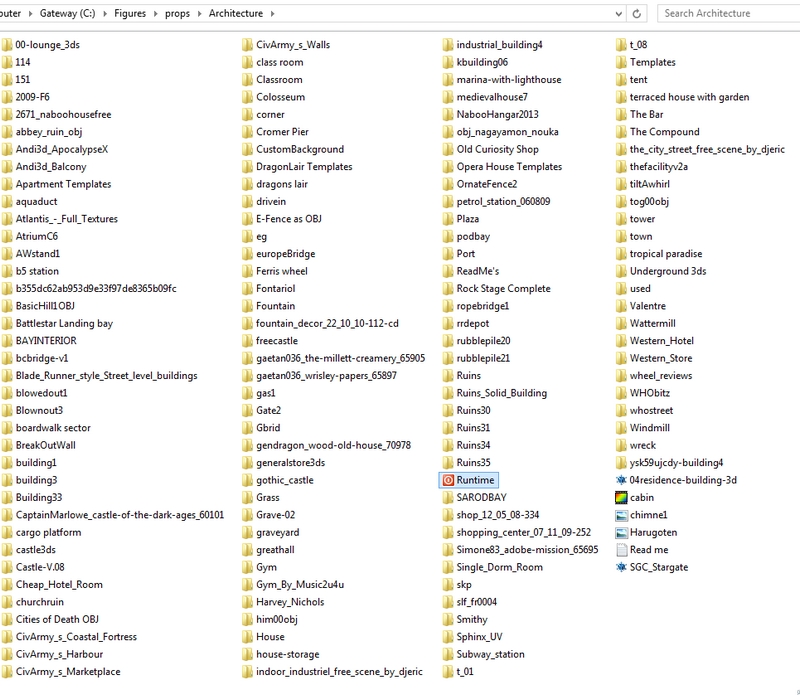
The screen cap above is of my "architecture" folder. Do you see the runtime? Everything else is nonStudio, nonPoser models.

MuffinMan123, I came from Poser and moved to Carrara 7. I was looking for something that would render much faster, and was researching Vue when I stumbled across some forum posts comparing Vue, Carrara, and Bryce.
Carrara is (IMO) much better than Poser by far, and I've never regretted moving to it, still my favorite software. Easier to texture, easier to pose, full animation capabilities and a modeler as well (still learning to model), has weightmapping and rigging, it really does it all, and much faster than Poser, also can handle scenes that would choke Poser to death.
Downsides for Carrara: (yeah, every software has them) You will have to learn a new interface, but I honestly find it far easier to pose my V4/M4 inside of Carrara. There are a lot of new features to deal with, you will have to tweak the textures of your characters (easily done inside of Carrara's texture room) as Carrara reads textures differently from Poser and your characters will look very shiny if you don't tweak at least the highlight and shininess shaders of their skin. I recommend getting Fenric's Poser Shader Doctor plugin for Carrara as it's only ten bucks and is a one click solution for Poser materials. It also comes with Skin Doctor included, and can be a one click solution or your V4/M4 skins, although I like to tweak the eye shaders myself.
Daz development for Carrara has been very slow and strange. It is still miles ahead of Studio and Poser, but as mentioned by others it is missing dynamic cloth. It has been announced by DAZ they are aiming at releasing Carrara 9 sometime first quarter of next year, so they are still working on developing it, but it took forever to get 8.5 out of development and released. And there is a niggling doubt in the minds of many Carrarists that someday DAZ might just decide to stop developing Carrara. Of course, even if all future development stopped immediately, Carrara is a genuinely powerful and full featured software suite. It has some problems, but absolutely nothing else even comes close to what Carrara delivers among paid software apps for the price point. It has an terrain modeler, volumetric clouds, realistic sky simulator, atmosphere controls, physics, particles, 3 different render engines built in, Vertex, Spline and Metaball modeling rooms, Rigging tools, tons of animation tools and options, replicated instancing and like I mentioned can handle big scenes without slowing down.
It may be the solution you're looking for; it was for me. Many of us who have been using Carrara for a while are apt to complain at how slow DAZ development has been, how certain bugs haven't been fixed, and how the upgrade fee to go from Carrara 8 to 8.5 was way higher than it should have been $85.50 as a best scenario. But though our complaints are valid (IMO) it shouldn't detract from the fact that for somebody who has never had Carrara the price is an absolute steal considering what it does (check out what Vue costs these days, for example, and even Poser Pro is sky high in comparison, even though it doesn't come close to being able to do what Carrara can do).
Anyway good luck to you, whatever you decide :)

Privacy Notice
This site uses cookies to deliver the best experience. Our own cookies make user accounts and other features possible. Third-party cookies are used to display relevant ads and to analyze how Renderosity is used. By using our site, you acknowledge that you have read and understood our Terms of Service, including our Cookie Policy and our Privacy Policy.
so far the only thing I understand about the difference between carrara ad poser is that carrara is all in 1 with creation abilities while poser is just a posing software with a large librar, but I still have questions about both
is Carrara able to load all the Daz shop stuff in the same manner as Daz studio? especially things like v4's power loader, morphs, and addon physics models and stuff? can it do everything that's in daz studio?
what is carrara's creation abilities? can it create clothing for v4 from scratch?
I got Poser pro 2012 1st because of the huge content library, but the content library is mostly transferable to Daz products. the thing that caught my attention with carrara was that someone mentioned that carrara is does everything faster than poser, and right now poser works really slowly on my computer so I am considering other options. of course I heard that version 9 is coming out so I could always wait, but I want to know more about carrara because everyone speaks highly of it.
does poser have any advantage over carrara other than its content library?
the thing I know is that not everything is transferrable from poser to daz product because poser has its own weight map settings. I want to know more so I can decide which one to be my native environment