
vilters opened this issue on Aug 19, 2012 · 13 posts
vilters posted Sun, 19 August 2012 at 4:41 PM
You can select Symmetry ON in X => takes some time in Hexagon on low end systems and hi poly figures.
Ok, time to move on. The dangerous part is over.
NOW, you are ready to morph.
In the left colon/window(select the little arrow), you “can” import the textures in the material zones.
Problem! Textures in Hexagon load inverted. You will have to flip them vertically. A known Hexagon bug.
You know Hexagon, so you can start morphing your Wendy.obj until you are satisfied with the result.
When satisfied with your morphed character, => Do 2 things:
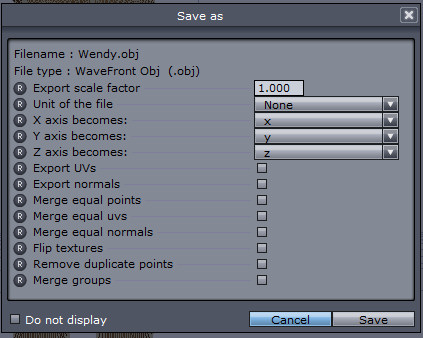
Leave everything unchecked in the popupwindow.
SCREENGRAB4
Poser 1, 2, 3, 4, 5, 7,
P8 and PPro2010, P9 and PP2012, P10 and PP2014 Game
Dev
"Do not drive
faster then your angel can fly"!