
vilters opened this issue on Aug 19, 2012 · 13 posts
vilters posted Sun, 19 August 2012 at 4:41 PM
STOP
WARNING!!!!!!!!!!!!!!! DO NOTHING!!!!!!!!!
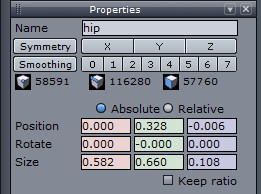
Take a paper and write down the numbers from the upper right hand window!!!!!!!!!!!!
In Properties window See position?
When absolute is selected?
Write down these 3 numbers
For Alyson I got: 0.000 0.328 -0.006
When relative is selected all is at 0.000
SCREENGRAB3
Poser 1, 2, 3, 4, 5, 7,
P8 and PPro2010, P9 and PP2012, P10 and PP2014 Game
Dev
"Do not drive
faster then your angel can fly"!