
vilters opened this issue on Aug 19, 2012 · 13 posts
vilters posted Sun, 19 August 2012 at 4:40 PM
Or? When you want to morph with textures you can copy Alysons textures to this Wendy folder and “optionally” rename them to Wendy textures. => It is safer to do so, and see the next tip on memory load if you are low on RAM.
Tip: If you are low on memory but still want to morph in Hexagon with the textures, resize Wendy’s textures to 1024x1024 pixels. => You can go as low as 512x512 and maintain visual control in Hexagon.
=> Goto your texture folder (optional) and copy/rename/resize the textures you want to use on Wendy in Hexagon in the Wendy’s folder in your library.
CAUTION; only use these SMALL textures for morphing in Hexagon.
Hint: never-ever work with original files. Always work on a copy, which is what we just did here.
Open Hexagon.
File Import, select Wavefront Obj (obj)
And import the Wendy.obj file from the Wendy folder.
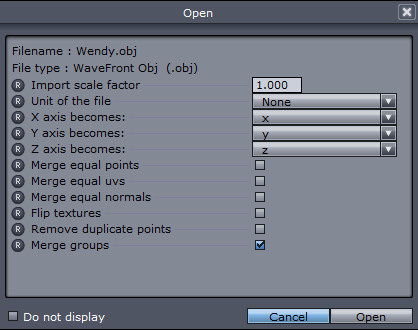
A popup window will come see screengrab for the settings.
ONLY “Select Merge groups”. Leave all the rest “as is”.
SCREENGRAB2
Poser 1, 2, 3, 4, 5, 7,
P8 and PPro2010, P9 and PP2012, P10 and PP2014 Game
Dev
"Do not drive
faster then your angel can fly"!