
gammaRascal opened this issue on Sep 18, 2011 · 37 posts
Quest posted Mon, 26 September 2011 at 10:52 AM
Thanks guys, hope you find them useful.
On reread of the toggle switching operation posted above I feel there may be some confusion regarding its use and requires some further explaination for clarity sake.
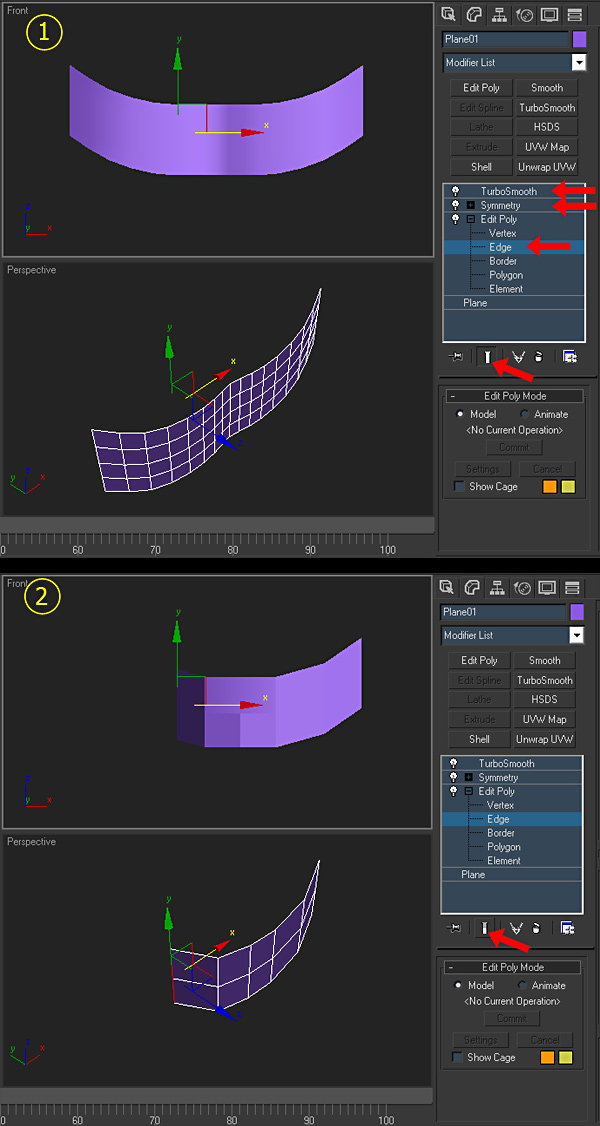
You’re still working on your model using edge modeling at the subobject level #2 (edge) and you’ve already applied the Symmetry modifier and your smoothing modifier of choice…in this case TurboSmooth to the top of the stack as shown in illustration #1.
Illustration #2: With the subobject level selected, if you toggle the “show end result” switch at the bottom of the stack it will allow you to work on your base model not showing the results of the modifiers. You can then view the progress by toggling the switch again to see the results of your work up to that point.
As a sidebar, say you don’t want to see one of the modifiers when you toggle on/off for whatever reason. Then you can click on the little light bulb to the left of the corresponding modifier to shut it off. Later on you may want to see how it affects the end result again, you simply mouse click on the light bulb again.