
Cage opened this issue on Dec 15, 2010 · 18 posts
bagginsbill posted Thu, 16 December 2010 at 6:54 AM
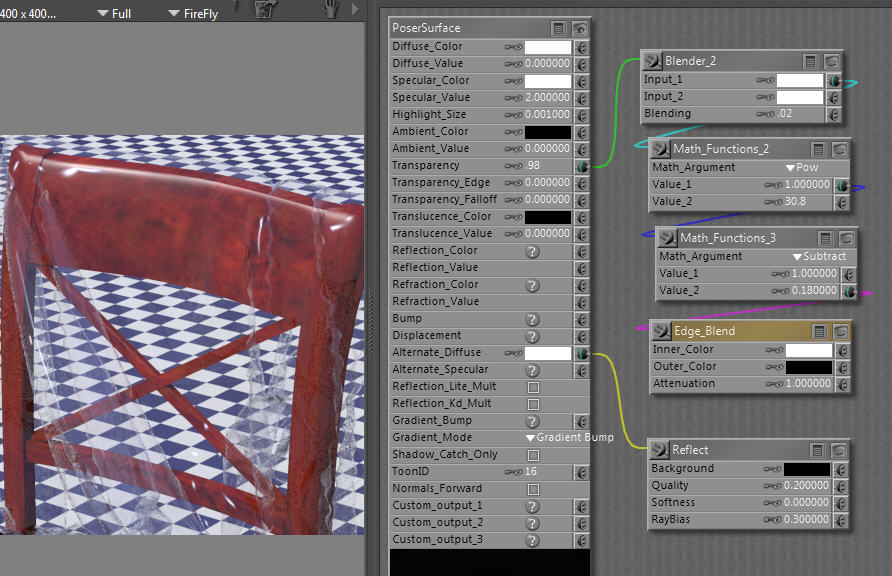
I'm pressed for time, so I'll not be able to give a long explanation.
Here are the highlights:
Thin plastic (or anything thin) doesn't refract much, so use of transparency instead of refraction can be a better way to go. Poser has a this-is-just-how-it-works problem that refractive objects cast a shadow as if they are opaque. Using transparency instead solves that and can produce faster renders.
On the other hand, the realism of this type of material is increased via gamma correction and if you do not have Poser Pro, then shader GC must be used. But shader GC with transparency can only be approximated. Shader GC with refraction can be done with precision because we don't ask the PoserSurface to do anything there except spit out what we tell it. But when we rely on transparency, for which there is no separate node, we cannot do the linear rendering equation that works in all situations and lighting. So, we have to tweak.
So I'm going to show you an un-tweaked shader that is using Poser Pro with render GC. If you don't have Pro, you will need to tweak. Mostly you'll want to adjust the Blending value in the Blender node that is currently .02 in this screen shot.
This is the simplest (fewest nodes) that gets you 95% realism. To get closer to 100% we need more nodes.
Depending on the geometry, you may find this excrutiatingly slow.
Renderosity forum reply notifications are wonky. If I read a follow-up in a thread, but I don't myself reply, then notifications no longer happen AT ALL on that thread. So if I seem to be ignoring a question, that's why. (Updated September 23, 2019)