
Renderosity Forums / Poser - OFFICIAL
Welcome to the Poser - OFFICIAL Forum
Forum Moderators: RedPhantom Forum Coordinators: Anim8dtoon
Poser - OFFICIAL F.A.Q (Last Updated: 2026 May 23 8:20 pm)

Subject: Dynamic Cloth Question


Only the figure's joints need to be zeroed. You can x-, y- and z-trans the figure anywhere you wish. Parent the clothing to the figure (if you haven't already done so), so it'll go along for the ride. Technically, you don't need to start with the figure in a zero pose; there's an option in the Cloth Room that'll zero the figure automatically for the draping phase of the calculations.

Oh, that's interesting! thanks, Love esther
I aim to update it about once a month. Oh, and it's free!

Load the figure and zero pose. Load the cloth and parent to the figures's hip. Load the dias and position. Move the figure so as to be correctly positioned relative to the dias. The cloth will position with it because of the parenting. Advance a suitable number of frames. For simple poses I usually use 30. Pose the figure ignoring what happens to the cloth. Now into the cloth room. Don't select the "from zero" option. I usually add ten or so frames to the simulation to allow the cloth to settle after the figure has attained its pose.


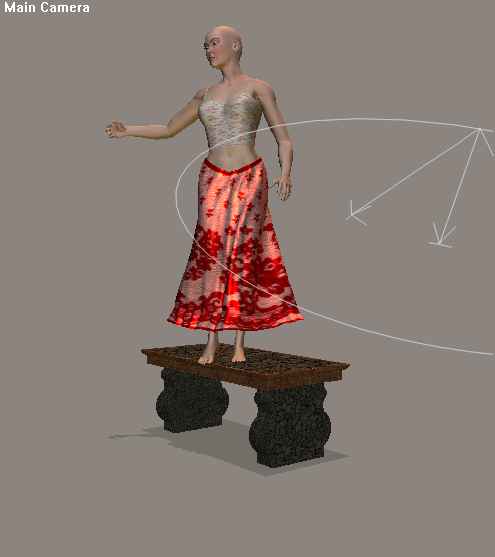

Hmm. "If I were you I wouldn't start from here" (old Irish joke..) Just a suggestion...I'm going to assume just 1 clothing article; if more than one, repeat for each article:-( 1. Save your figure's pose in one of the UI slots, or save it to a temp pose library, or as a posed character, whichever you are happiest with. 2. Start a new scene. Add just your figure and the clothing you wish to clothify. At frame 10 (at least, depending on the type of clothes), add a key frame and set the figure's pose. Now do the simulation. Keep going til it looks more or less right for the "no props" situation. 3. Export the clothing as a .obj file. 4. Open your scene with the props. Import the clothing.obj and move it til it's in correct place on your figure (tricky and finicky - I said "don't start from here"..) 5. For each of the props that are intersecting with your clothing: a. make a note of the x/y/z location. (or use ctrl-c in the properties to copy it (in Windows - don't know about Macs) b. move prop (in frame 1) so it's no longer intersecting. c. Skip to frame 10 (20? - it depends..) d. position prop in correct place (ctrl-v in the properties if you ctrl-c'd it) e. Go back to frame 1. 6. Clothify the offending article; UNCHECK "Start from zero pose". Run the simulation. 7. Pray that it works.... It's probably best to let the simulation run for the full 30 frames to give the cloth time to settle (if that's the effect you are after) - might be longer, it depends on the type of material and the mesh of the clothing. Only experiment/experience can tell.. I really hope this helps.. (There's proabably a better way - but if so I don't know it yet. This is the longest bookmark I've ever posted!) Cheers, Diolma

Privacy Notice
This site uses cookies to deliver the best experience. Our own cookies make user accounts and other features possible. Third-party cookies are used to display relevant ads and to analyze how Renderosity is used. By using our site, you acknowledge that you have read and understood our Terms of Service, including our Cookie Policy and our Privacy Policy.
So... every tutorial I read wants me to start everything from a zero pose, and not have the dynamic cloth intersecting with anything that it is going to collide against. That's all fine and dandy if there are no other props of figures other than the figure wearing the dynamic cloth. What do you do when you have set pieces and props that need to react to the cloth? Like having your figure standing on a raised dias? At zero, the figure is within the dias and so if the cloth! Suggestions, comments and other bon mots welcome. best, e.d.